
For Clerkenwell and Moorgate Campuses
What should I do if I can’t complete registration?
If you are unable to login then please contact the IT Service Desk.
What should I do if I’ve forgotten my password?
You must register for ‘Self-Service Password Reset’ Setting up your self-service account is a one-time process, and allows you to access Office 365 and reset your password (should you forget it) without contacting the IT Service Desk
- Visit https://pwdreset.city.ac.uk
- Login with your username (e.g abcd123) and password.
- Setup additional security verification methods of your choice, either:
- A mobile phone number – you will be sent a text should you reset your password.
- Security questions – you will be asked to answer three security questions should you reset your password.
Please note: when you register, ensure the information you provide cannot be seen by others.
When are first prompted, you will see a message asking for more information, select 'Next'. If you are unable to complete the sign-up process at this time select 'Skip setup', to postpone for up to two weeks.
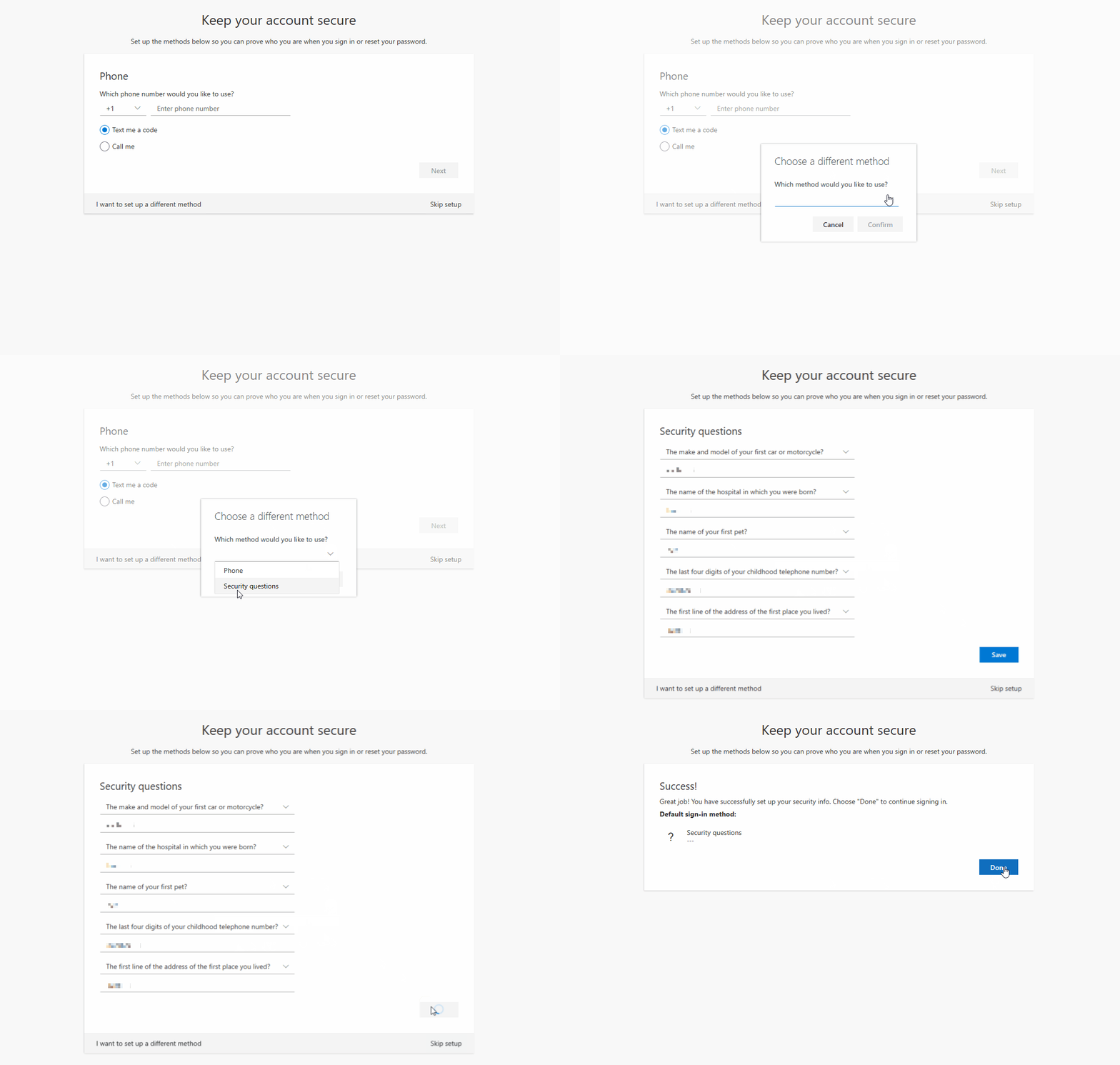
To continue setting up your security information you can choose between the following options:
- Phone number
- Security questions
Phone Number
If you wish to provide a phone number as part of your security information choose the UK (+44) country code then enter your mobile number leaving out the leading 0.
- A code will then be sent to your mobile. Enter this code and click ‘Next’
- Click ‘Done’
- You have now registered your information for password self-service.

Security Questions
If you do not wish to provide your mobile number as part of the security verification process click ‘I want to set up a different method’ link at the bottom left to use an alternative method.
- Choose five different questions from the drop-down selection and enter your answers
- Click ‘Save’
- Click ‘Done’
- You have now registered your information for password self-service.
 Once these stages are complete you will have successfully set up your City St George's University of London IT account.
How can I change my password?
Information on how to change your student password can be found at https://studenthub.citystgeorges.ac.uk/information-technology/faq.
What happens to my email after I graduate?
Your City St George's account is deactivated once you complete your course. You will be given notice of this change by email and you will have 275 days to export any files and data before your account is closed and deleted.
There is no account recovery following deletion, and the closure period cannot be extended. Once erased there is no data to retrieve.
To continue using your email account, you are required to be compliant with City's St George's IT policies. This includes the password policy which requires you to update your password every 12 months to stop your account from being deactivated and deleted.
Apart from the Library, where else are there open access PCs?
Information on the location of computing labs, opening hours and 24-hour lab access can be found on the computer rooms page.
Do you fix personal computers?
We do not fix personal computers. However, we will provide guidance on repair shops.